← All modules Maintenance · CMMS

Your regulatory inspections, traceable and audit-proof.

Preventive plans, regulatory inspections, corrective work and contractors in one tool. Periods generate themselves, delays stand out, and every completed task leaves evidence you can show an auditor.
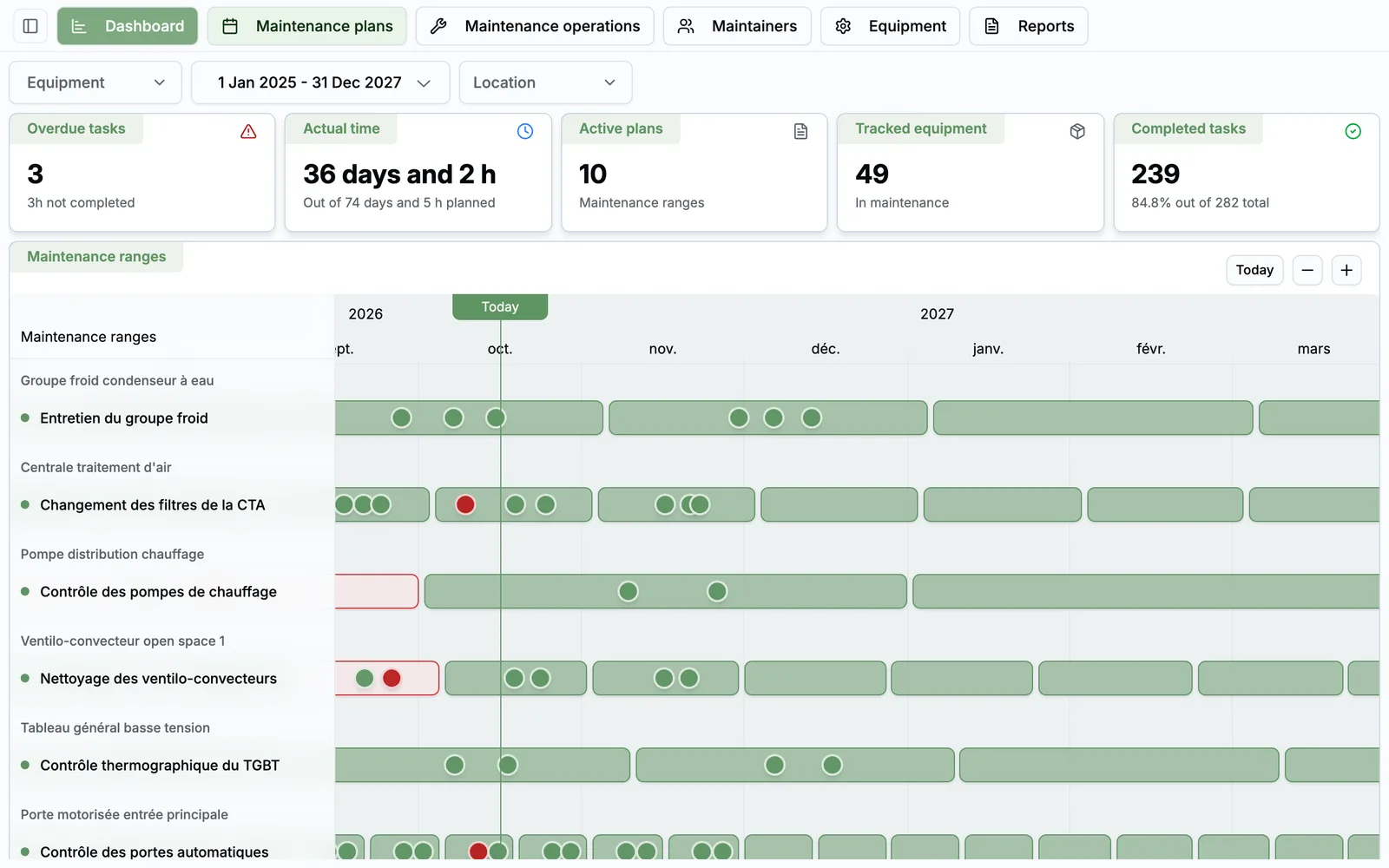
app.taskfm.fr
CMMS, as your teams see it
22features shipped
29%have had an auditor visit with no centralised history (Task FM 2026 survey)
Recurrence from daily to yearly
A space for each contractor

Maintenance in a spreadsheet is a risk

A missed deadline is expensive

A forgotten regulatory inspection means a non-compliance, sometimes a shutdown. A spreadsheet warns nobody.

Scattered evidence

Contractor reports in inboxes, photos on a phone, certificates in a shared folder. On audit day, everything has to be gathered.

Billed time you can't verify

The contractor declares hours, you have nothing to compare. 32% of managers have had broken equipment without knowing who maintains it.

A CMMS built for facility teams

Complete enough for regulatory inspections, simple enough for your contractors to use.

01

Asset register

3 features
  • A structured register Code, trade (HVAC, electrical…), family, brand, model, serial number and location for every asset.
  • A complete asset record Specs, maintenance schedule, linked plans and corrective history, all in one place.
  • One register for everything The same assets serve preventive maintenance, regulatory inspections and corrective work.
02

Preventive maintenance

4 features
  • Flexible recurrence Every N days, weeks, months or years, with a separate completion window. Periods are calculated automatically.
  • Plans with planned time Each plan lists its tasks and their expected duration. Every period picks those tasks up automatically.
  • Gantt and forward schedule See every plan on a Gantt chart, with the forward schedule through the end of next year.
  • Actual versus planned time For each task, the percentage gap between announced and actual time.
03

Regulatory inspections

4 features
  • A dedicated space Dashboard, inspections, operations, non-compliances and regulated assets in one sub-module.
  • Stricter rules A regulatory task must be scheduled before it's completed, and can't be declared done before its planned date.
  • Delays in plain sight Scheduling delays and completion delays: every overdue period is flagged on the dashboard.
  • Non-compliances tracked Entered in bulk, tracked from “to clear” to “cleared”, with matching indicators.
04

Corrective work and contractors

6 features
  • From quote to payment Ten locked statuses: quote, disputed, approved or rejected quote, works, done, approved, invoiced, paid.
  • Kanban, on mobile too Drag jobs from one column to the next. An invalid transition is simply refused.
  • A space for each contractor They schedule and record tasks, attach reports and move corrective work forward.
  • You have the last word Dispute the time or comment a contractor declared. Your version is what goes in the report.
  • Certifications up to date Technicians upload their certifications with expiry dates and supporting documents.
  • Certified tooling Tool certifications with a 30-day warning, and an alert if a plan uses an uncertified tool.
05

Reporting and evidence

5 features
  • Signable PDF report By period, site, asset or plan: KPIs, task detail, comments, photos and a sign-off page.
  • Five languages Reports in French, English, Spanish, German or Italian, based on your organisation's language.
  • Evidence filed automatically Documents attached to tasks are stored in the document library, by plan and by period.
  • Annual dashboard Overdue tasks, hours completed versus planned, 12-month trend.
  • Supplies store Stock in and out, shortages and items to reorder. Withdrawals beyond stock are refused.

From plan to proof

  1. 1 Register

    Your assets are loaded into the register, site by site.

  2. 2 Plan

    You create plans and their recurrence. Periods generate themselves.

  3. 3 Perform

    The contractor schedules, performs and attaches evidence from their space.

  4. 4 Check

    You compare actual time with planned time, and dispute it if needed.

  5. 5 Prove

    The signable PDF report is ready for leadership or the auditor.

Who does what, day to day

  • Facility manager

    Runs assets, plans, regulatory inspections, corrective work, the store and reports.

  • Maintenance contractor

    In their own space: schedule, tasks, evidence, corrective work, certifications and tools.

  • Leadership

    Gets clear, signable PDF reports with completion rates and delays.

With Greg, the Task FM AI

Greg queries your CMMS and registers new assets for you.

Meet Greg
  • “List the active maintenance plans.”
  • “Which maintenance operations are due this month?”
  • “Register air handling unit AHU-02 on the 4th floor.”
FAQ

All about CMMS

Do our contractors need to create an account?

You add them with a name and an email. They then only access their own space.

Can you import our existing assets and plans?

Yes. Our team imports your assets and maintenance plans during setup.

Are regulatory inspections handled separately?

Yes. A plan flagged as regulatory follows stricter rules and has its own dashboard, with non-compliance tracking.

See CMMS on your own use cases

A 30-minute video call with a facility services expert. We start from your sites, your current tools and the module that costs you the most, and we show you the application in real conditions.

  • A live demo of the application, not slides
  • Focused on your priorities, module by module
  • No commitment

Damien Dehoul

Founder, Task FM

Live demo, on your own use cases

Pick a time slot

30-minute video call with an FM expert. No commitment.