← All modules Facility · Visitor management

Employees invite the front desk to their meeting. The rest is automatic.

The visit is created from Outlook, the visitor gets access details and a reminder, and the host is notified on arrival. And you know in real time whether your front desk is properly staffed.
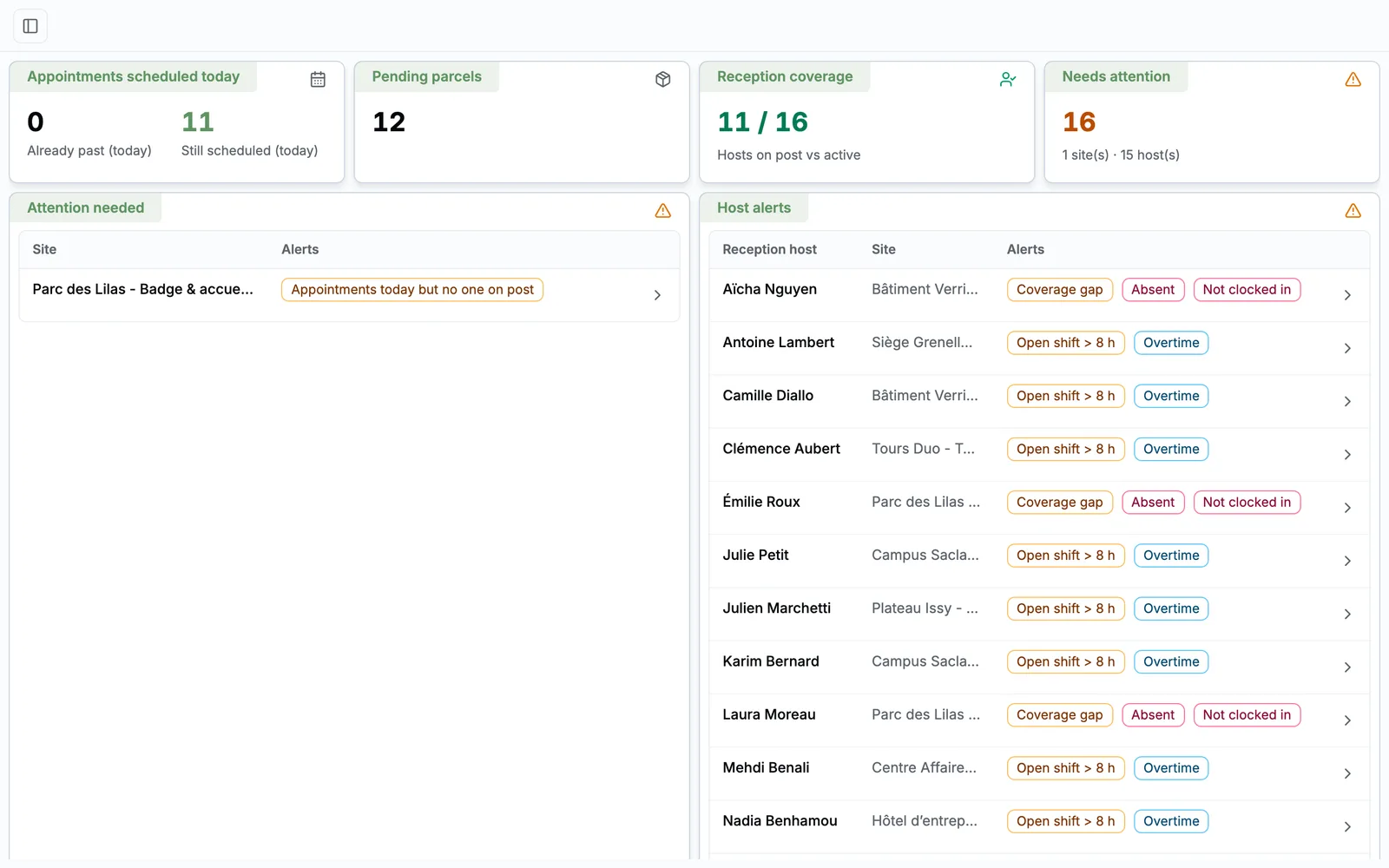
app.taskfm.fr
Visitor management, as your teams see it
21features shipped
Visits created from Outlook
“Your visitor has arrived” emails
Front desk attendance with alerts

The front desk is your first impression and often the least equipped

Visitors nobody expects

The employee forgot to say, the badge isn't ready, and reception calls every office while the visitor waits.

A useless visitor log

A notebook or spreadsheet that's impossible to use when security or an auditor asks who was on site, and when.

An invisible front desk

Late staff, uncovered desk, untracked overtime: you find out when an employee complains.

Your whole front desk, from visitors to staff

Three connected spaces: management for you, the desk for reception staff, and a space where every employee invites their visitors.

01

Visits

4 features
  • An Outlook invitation is enough The employee adds the front desk address to the meeting. A visit is created for each external guest and updated if the meeting changes.
  • Or created in two clicks By the employee from their space, or by reception staff from the desk, for an employee on their site.
  • A clear lifecycle Expected, arrived, cancelled, no-show. Every change is timestamped with its author, and can be commented.
  • Agenda and week view Visits as a list or calendar, with the current time and colour-coded statuses.
02

Visitors and employees informed

6 features
  • An invitation email for the visitor With the date, the host and arrival instructions.
  • Your documents attached automatically Access map, safety rules, policies: up to 20 documents per site, attached to every invitation.
  • A reminder the day before The visitor receives a reminder about 12 hours before the visit.
  • “Your visitor has arrived” The employee is emailed as soon as reception logs the arrival. No more calling around offices.
  • Daily summary Each employee receives the list of their visitors for the day.
  • In five languages Twelve email templates in French, English, Spanish, German and Italian.
03

Badges and parcels

3 features
  • Badge stock per site Active, issued, lost, disabled: every badge has a full history.
  • Badge linked to the visit On arrival, staff issue an available badge. Its return is logged, and a loss is attributed to the visitor.
  • Parcels released by code A 4-digit pickup code is emailed to the recipient. The parcel is only handed over against that code, never twice.
04

Front desk staff

5 features
  • Hours to cover per site Day by day and per person, with a colour-coded weekly schedule: planned, on time, gap.
  • Clock-in built into the desk The desk only opens once staff have clocked in. Clocking in becomes a habit, not a chore.
  • Alert when the desk isn't staffed Five minutes after the scheduled start, if nobody has clocked in, you get an email.
  • Planned versus actual Lateness, absences, early departures and overtime calculated per person and site. Ideal for managing a reception contractor.
  • Tracked corrections Correct a clocking on a timeline. Every correction is recorded, nothing is overwritten.
05

Multi-site management

3 features
  • Today's risks Site with no staff assigned, visits planned with nobody on duty, expected peak traffic.
  • Expected traffic By hour for the day and over the next seven days.
  • PDF activity report By site and period: arrival rate, no-shows, traffic per half hour, badges, parcels, comparison with the previous month.

A visit, without a single call

  1. 1 Invite

    The employee adds the front desk to their Outlook meeting.

  2. 2 Inform

    The visitor gets the invitation, access documents and a reminder.

  3. 3 Welcome

    Staff log the arrival and issue a badge.

  4. 4 Notify

    The employee receives “Your visitor has arrived”.

  5. 5 Log

    Visit, badge and hours stay in the history and the report.

Who does what, day to day

  • Employee

    Invites visitors from Outlook or their space, is notified when they arrive.

  • Reception staff

    Clock in, welcome visitors, hand out badges and parcels, create visits for their site.

  • Facility manager

    Manages sites, hours, staff, alerts and reports.

  • Visitor

    Receives a clear invitation, documents and a reminder, with no account.

FAQ

All about Visitor management

Do employees have to change how they invite guests?

No. They keep inviting from Outlook: they just add the front desk address to the meeting.

Our reception is outsourced. Is this a good fit?

Yes, it's one of the strongest use cases: hours to cover, clock-in, alerts and planned-versus-actual give you an objective view of the service.

What equipment does the front desk need?

A computer or tablet with a browser, nothing more.

See Visitor management on your own use cases

A 30-minute video call with a facility services expert. We start from your sites, your current tools and the module that costs you the most, and we show you the application in real conditions.

  • A live demo of the application, not slides
  • Focused on your priorities, module by module
  • No commitment

Damien Dehoul

Founder, Task FM

Live demo, on your own use cases

Pick a time slot

30-minute video call with an FM expert. No commitment.