← All modules Facility · Furniture

One QR code per item. One scan to know everything.

Every item is tagged, linked to its room and valued. You inventory a room by scanning what's in it, and Task FM tells you what's missing, with the date it went missing.
app.taskfm.fr
Furniture, as your teams see it
15features shipped
Inventory by smartphone scan
Missing items detected
Real-time furniture value

Your furniture inventory dates from the last move

A file that's never up to date

The spreadsheet was made three years ago. Since then floors have moved, chairs have migrated, and nobody really knows what's where.

Duplicate purchases

Without knowing what's sitting in storage or on another floor, you buy what you already own.

No usable value

The insurer, accounting or leadership ask for the furniture's value. You start again from invoices, when you can find them.

A furniture inventory that stays alive

Tagging, inventory by scan, moves, end of life and value: the full lifecycle of a piece of furniture.

01

Creation and tagging

4 features
  • Batch creation Enter a model once (type, finish, dimensions, price, invoice, supplier, photo) and apply it to 20 chairs by scanning 20 labels.
  • Zero duplicates A QR code already in use is rejected. Each label matches exactly one item.
  • A rich catalogue 15 furniture types, over 20 finishes, 4 conditions: new, used, worn, broken.
  • Step-by-step wizard Location, details, photo, scan. Unneeded steps are skipped if you only have one site or building.
02

Physical inventory

4 features
  • Room by room, by scan Pick the room, scan the QR codes present, confirm. A room takes a few minutes.
  • Missing items flagged Any expected item that isn't scanned becomes “not located since…”. You know exactly what disappeared, and when.
  • Scan to open the record Scan an item's label to instantly see its full record.
  • A QR code on every door The room's QR code opens the list of furniture inside and starts its inventory.
03

Moves and end of life

3 features
  • Every move tracked Site, building, floor, room: each move is timestamped and the current position is always right.
  • Direct relocation Unlocated items show how long they've been missing and can be put back in one step.
  • Retirement and restore Retire an item with its date. If it comes back, restore it to a new room.
04

Value and reporting

4 features
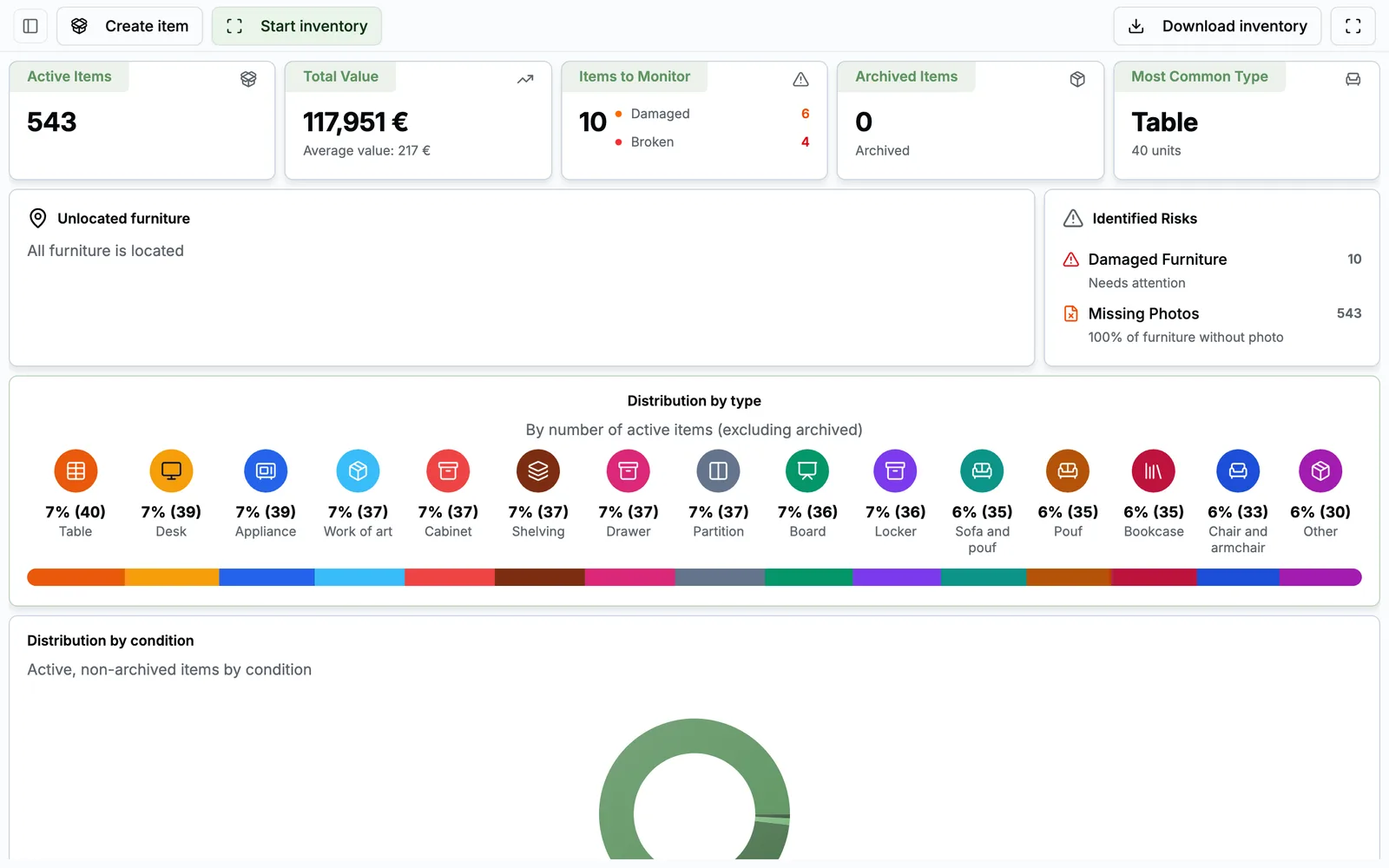
  • Real-time furniture value Total value, average value, items to watch, retired items, most common type.
  • Risks surface on their own Damaged or broken items, missing invoices, missing photos: one click opens the filtered list.
  • Six breakdowns By type, condition, site, building, floor and model.
  • Export ready for accounting An Excel-compatible CSV with location, price, dimensions and invoice number for each item.

From label to balance sheet

  1. 1 Tag

    Each item gets a QR code, created in batches by model.

  2. 2 Locate

    It's linked to its room in your site register.

  3. 3 Count

    Room by room, by scan. Missing items are flagged.

  4. 4 Move

    Every move is tracked, the position is always right.

  5. 5 Value

    Furniture value, risks and an export for accounting or the insurer.

Who does what, day to day

  • Facility manager

    Builds the register, runs inventories, tracks moves, exports.

  • Office manager or field team

    Scans, counts and moves items from their phone.

  • Leadership and accounting

    Get the furniture value and a full export.

FAQ

All about Furniture

Do we need a barcode scanner?

No. Scanning uses the smartphone camera, right in the browser. Manual code entry is also available.

Can we inventory a floor without re-entering everything?

Yes. You run the inventory room by room, scan what's there, and Task FM compares it with what was expected.

Can we export the inventory?

Yes, as an Excel-compatible CSV with location, price, dimensions and invoice number for each item.

See Furniture on your own use cases

A 30-minute video call with a facility services expert. We start from your sites, your current tools and the module that costs you the most, and we show you the application in real conditions.

  • A live demo of the application, not slides
  • Focused on your priorities, module by module
  • No commitment

Damien Dehoul

Founder, Task FM

Live demo, on your own use cases

Pick a time slot

30-minute video call with an FM expert. No commitment.