← All modules Facility · Work orders

Every request captured, handled and approved by the person who made it.

Employees report an issue by scanning a QR code, with no account. The right provider is notified straight away, photo included. And a work order is only closed when the requester confirms it's really done.
app.taskfm.fr
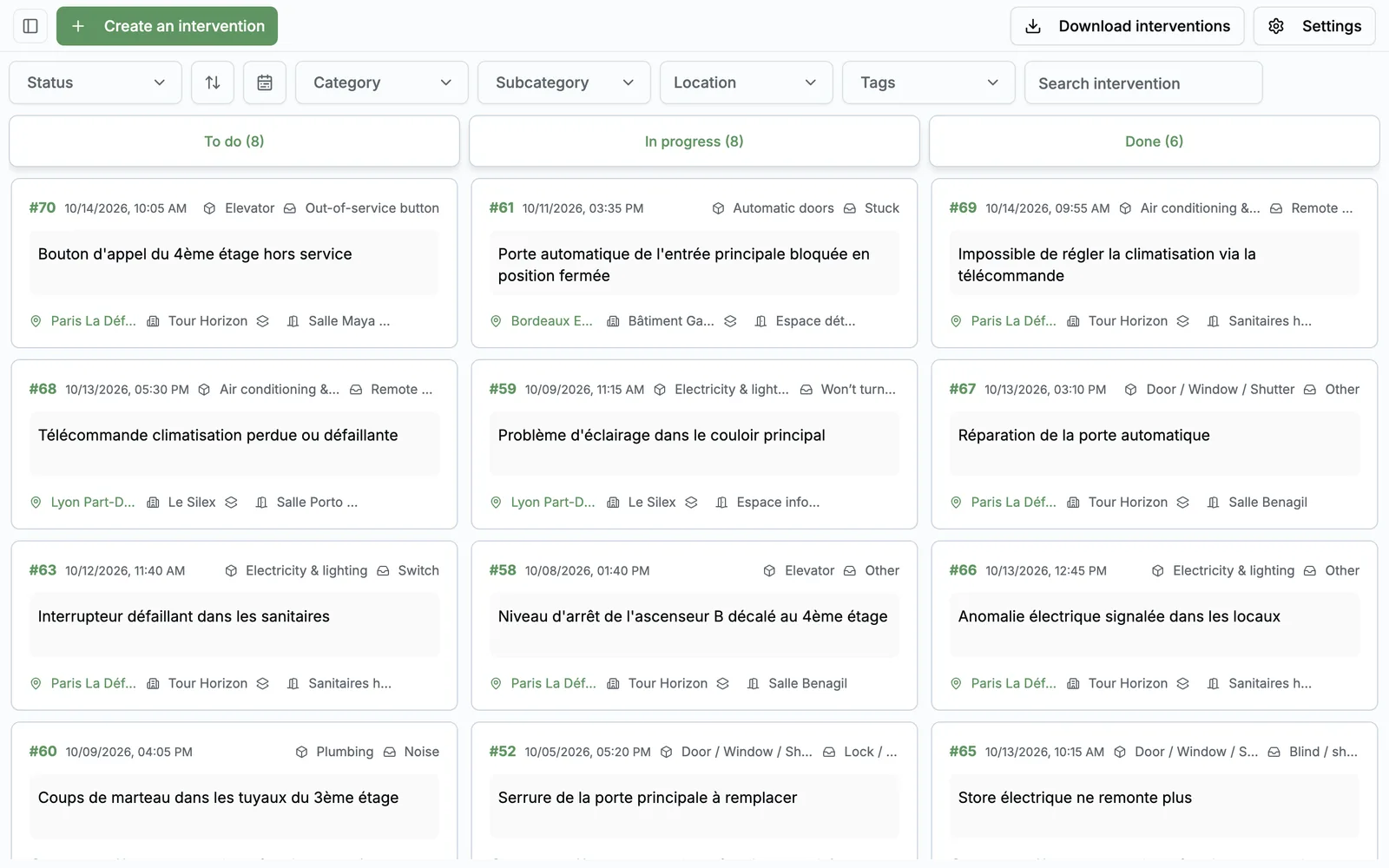
Work orders, as your teams see it
20features shipped
82%of requests arrive by email (Task FM 2026 survey)
No account, no app to report
Provider notified automatically

Today, requests get lost along the way

They come through every channel

Email, Teams, phone, a word in the hallway. Nothing is centralised, and every request has to be retyped before it can be handled.

Nobody knows where they stand

The employee chases you, you chase the provider, the provider doesn't know who asked for what. 47% of managers have an employee chasing their request every other day.

No way to prove the work done

The day leadership asks for an average lead time or a provider comparison, everything has to be rebuilt in Excel.

The full request lifecycle, from report to reporting

From the public form to the PDF report: reporting, providers, closure by the requester, steering.
01

Reporting an issue

4 features
  • No account, no app A three-step public form: area, category, description. Requesters leave their email if they want updates.
  • One QR code per room Stuck on a wall, it pre-fills the location. Only the categories relevant to that room are offered.
  • Photo or video from the spot The employee photographs the issue on their phone. The photo follows the request all the way to the provider.
  • One shareable reporting link A link for your intranet, an email signature or a flyer, covering all your sites.
02

Handling and providers

6 features
  • The right provider, notified automatically Each category is linked to its providers. They get an email with the photo and a direct link to the request.
  • A dedicated provider portal Providers only see requests in their categories, update status, comment and download the work order.
  • Categories enabled per location Cleaning on some floors, HVAC on others: you decide what can be requested, and where.
  • Kanban board, on mobile too Five columns, filters by site, area and category, free tags, and a dedicated mobile view to manage from the field.
  • Frictionless reassignment Changing a request's category sends it to the new provider automatically, history included.
  • Ready-made category catalogue Standard families and subcategories set up by our team at launch. You adjust, you don't start from scratch.
03

Closing and satisfaction

4 features
  • Requester approves in one click When the provider marks it done, the requester gets an email: “Approve” or “It's not done”.
  • A rejection re-notifies the provider If it's not done, the request goes back to “To do” and the provider is notified again, automatically.
  • 1-to-5 satisfaction rating After approval, the requester rates the job. You finally measure perceived quality, by category and provider.
  • Full, timestamped history Every status change, every comment, time spent in each stage, and which provider closed it.
04

Management and reporting

6 features
  • Period PDF report Requests created, completed, approved, mean time to resolution and average rating, compared with the previous period.
  • Written analysis included The report comments on trends by itself: “up 12%”, “resolution time improved”. Ready for your steering committee.
  • Providers compared objectively Volume handled, average lead time and average rating per provider, plus the top 10 longest jobs.
  • Attention points Requests to reassign, overdue beyond the threshold you set, or completed and awaiting approval.
  • PDF work orders and CSV export One work order per request, downloadable by you and the provider. Plus a full Excel-compatible export.
  • Five languages Emails and PDFs in French, English, Spanish, German and Italian, based on your organisation's language.

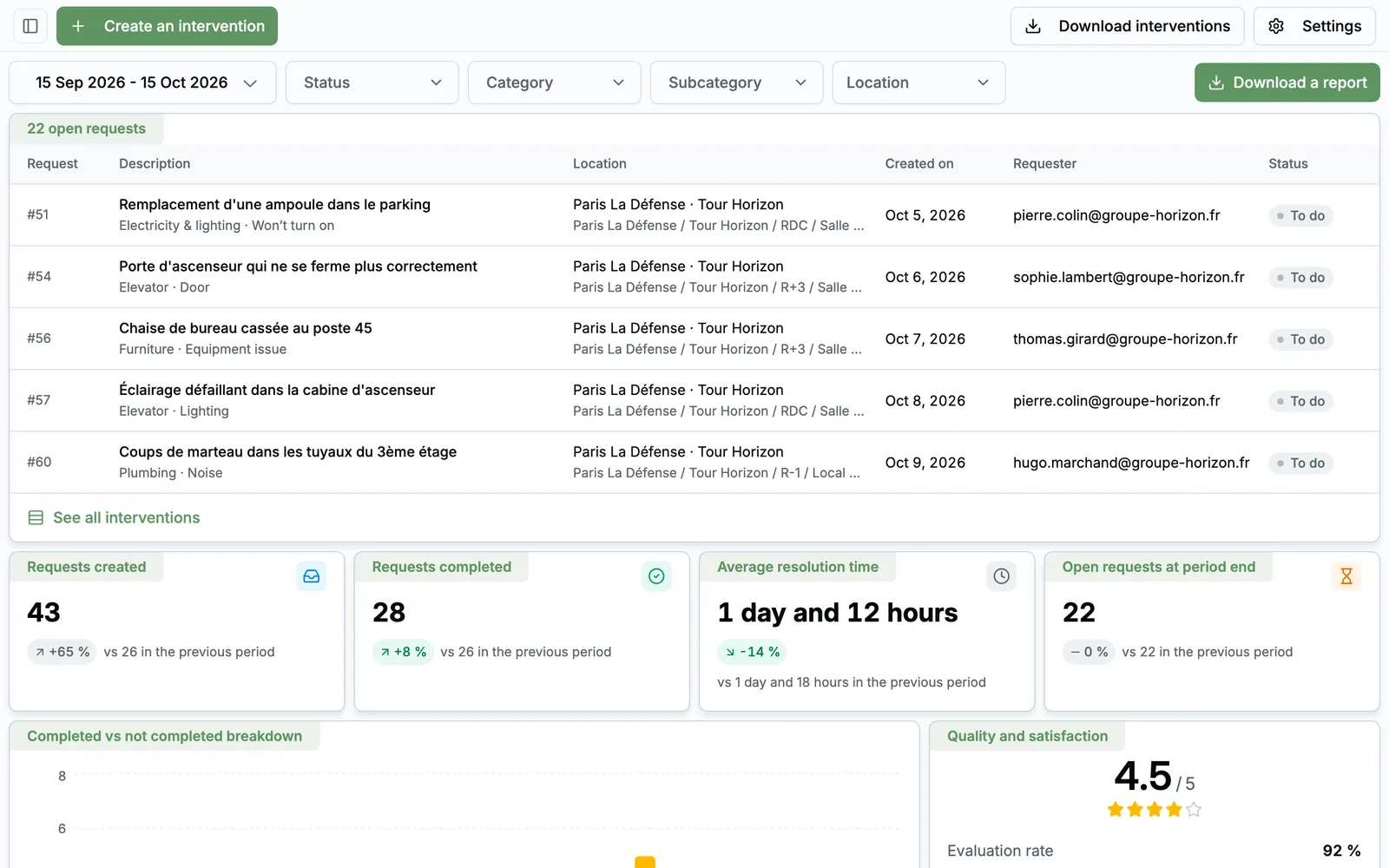
The dashboard, point by point

app.taskfm.fr
Work orders, as your teams see it 1234
  1. 1
    Open requests

    Every open request, with location, requester and status.

  2. 2
    Period indicators

    Created, completed, average lead time, compared with the previous period.

  3. 3
    Satisfaction

    Requesters' average rating and rating rate.

  4. 4
    PDF report

    The period report in one click, ready to share.

A request's journey, in five steps

  1. 1 Report

    The employee scans the room's QR code, picks the issue and adds a photo.

  2. 2 Notify

    The category's provider gets an email with the photo and a direct link.

  3. 3 Handle

    They move the request forward in their portal. You follow it all on the Kanban board.

  4. 4 Approve

    The requester confirms in one click that it's fixed, or sends it back.

  5. 5 Report

    Lead times, satisfaction and provider performance in your period report.

Who does what, day to day

  • Employee

    Reports with no account, follows the request by email, approves and rates the fix.

  • Facility manager

    Sets up categories, locations and providers, runs the Kanban board, produces reports.

  • Service provider

    Receives requests, handles them in the portal, downloads the work order.

  • Leadership

    Read-only access to reports: volumes, lead times, satisfaction.

With Greg, the Task FM AI

Greg creates requests and tells you where your work orders stand, in plain language.

Meet Greg
  • “Create a work order: water leak in the 3rd floor restrooms.”
  • “How many work orders are in progress, by category?”
  • “List open work orders at the Lyon site.”
FAQ

All about Work orders

Do employees need an account?

No. They report through a link or QR code, with no account and no app. If they leave their email, they get the acknowledgement and the approval link.

Do our providers have to use Task FM?

They receive requests by email and have a dedicated portal limited to their categories. They can do everything from the link in the email.

Can categories differ from site to site?

Yes. Each category can be enabled or not for each location, down to the floor or room.

Can we produce a report for leadership?

Yes, as a PDF, for the period and scope of your choice, compared with the previous period and with an automatically written analysis.

See Work orders on your own use cases

A 30-minute video call with a facility services expert. We start from your sites, your current tools and the module that costs you the most, and we show you the application in real conditions.

  • A live demo of the application, not slides
  • Focused on your priorities, module by module
  • No commitment

Damien Dehoul

Founder, Task FM

Live demo, on your own use cases

Pick a time slot

30-minute video call with an FM expert. No commitment.